


Lucky Colour

You will need:

Color Tiles (x5 minimum) The Wheel of Fortune (x1) Gates (x5) Dividers (Varies on layout)

This guide will show you how to set up the game Lucky Colour for you to host. For more information on the game, including how to play, check out our wiki page by clicking here.

Step 1: Split the area

Using dividers, split the playing area into six sections; 5 colour areas and one middle area for players to get from one section to the other. They can be any size or shape you want. Add one gate to each area. If you want to know how to set up wired so that each gate does not need to be opened manually, click here for a guide.
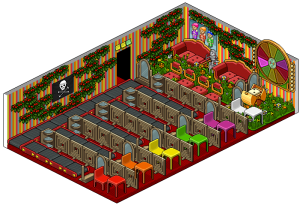
Image result for habbo lucky colour

Step 2: Add some colour

Place at least one Color Tile in each of the five sections. You may choose to only add one tile in each, or you can cover the entire floor. It’s up to you, as long as there is at least one in each. Double click the tiles to change their colours and set each section to a different colour; yellow, red, purple, blue, and orange.
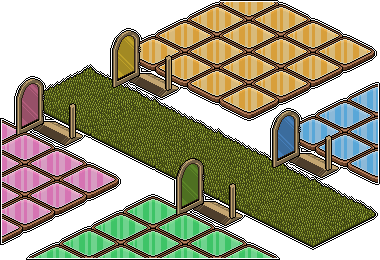
Once you’re done, place a Wheel of Fortune on the wall!

Related guides
  • Events Timetable
  • Latest Wiki edits
    Wiki Page User
    Iridescent Skin
    Hottsardine
    Executive Drinks Cabinet
    Hottsardine
    Rare Arcade Cabinet
    Hottsardine
    LTD Rare Golden Apple
    Hottsardine
    Cosmos Horns
    Hottsardine
    Fire Overlord Outfit
    Hottsardine
  • Upcoming DJs
  • Staff of the Month
    Jay
    Jay
    Jay successfully ran our May badge event & not only coordinated the team, but goes above & beyond and helping out where needed!
    Hassled
    Hassled
    Hassled is a creative genius in our graphics department; she has put out amazing work for badges from our badge events!
  • Latest Badges
  • Latest forum posts
    Thread User
    A-Z Cities of the World
    Shockwave.2CC
    A-Z of Animals [Lucy]
    Shockwave.2CC
    A-Z Countries of the World
    Shockwave.2CC
    A-Z Famous People of the World
    Shockwave.2CC
    A-Z GIRLS & BOYS Name Game
    Shockwave.2CC
  • Latest Comps
    Thread User
  • HabboxLive Radio
    Loading…
    0
    Message the DJ
    Submit