


You will need:
This guide will show you how to set up the game Multitasking for you to host. For more information on the game, including how to play, check out our wiki page by clicking here.
Step 1: The Rollers
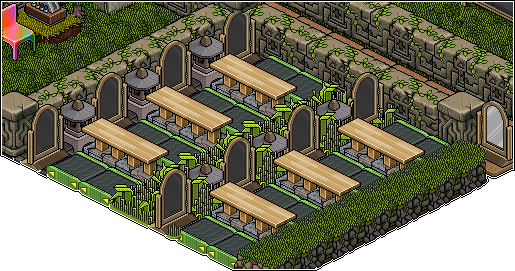
Start off with your empty playing area, then place your rollers in pairs with a 1 space gap between them, but a 2 space gap below them. You’ll then need to rotate them so they all face forward. (whichever direction Forward is to your room)

Step 2: Filling in the gaps
In this step, you just need to do exactly as the name suggests. We fill in the gaps. So let’s start off with the flooring. If you’re using 2×2 flooring, eg. Grass, then you’ll find it’s restricted in where it can go, as most gaps are only 1 thick, but don’t worry. Just place the flooring everywhere it can go. Once you have done that, place your dividers between the rollers in the 1 space gaps. Once you have placed your flooring and dividers, it’s time to place the gates. The gates go in front of the pairs of rollers, so the players will roll onto them from the rollers.
Step 3: Setting up your WIRED
The wired for this event is very easy compared to other events, but it’s also very effective. It only requires one stack consisting of all of the wired listed above. Set your Trigger: User Walks on Furni to all of the flooring and gates. Set your Effect: Teleport to Furni to the place people teleport to when they ‘exit’
The condition is a little more confusing. You will need your furniture that can change states. (I used a candle). Have it in any state you want and wire your Condition: Furniture State and Positions Match to it, ensuring ALL boxes are ticked. (Note: This furniture can now not be moved or the wired will break, so ensure you wire it in the position you want). When you are letting players in, this item must be turned off. This will make sure that the new players will not teleport out upon entering the playing area. Once all players are in, change its state to activate the WIRED.


