


Chance Wired
Chance Wired
You will need:
1 x User Walks On Trigger
2 x Teleport to Furni Effects
1 x Random Effect Wired Add-on
1 x Tile / Furni (for the triggering user to walk on)
2 x Tiles / Furnis (for the user to teleport to)
Banzais glitching, not working or just not in your inventory? Not to worry, you can easily use wired instead! This guide will show you how to easily wire 3 tiles to have the same random outcome as 3 banzais would!
Step 1: Wire your triggering tile
First you need to wire the tile that your user will be stepping on to teleport them. To do this double click the ‘User walks on’ wired trigger and select your tile, then click ‘ok’.

Step 2: Wire your landing tiles
Next you need to wire your two landing tiles. Each ‘tele to furni’ effect needs to be wired to one of these tiles.
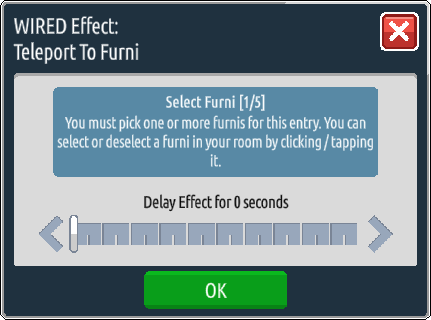
In this example, I’ve used two color tiles – one red and one green. It is important that two separate teleport to furni effects are used so that the ‘random effect’ add on can work adequately.

Step 3: Stack ’em up!
The ‘random effect’ has no set-up requirements, and so it will function simply by being in the stack. And so the final step is to stack up your wired!
Related guides


