 Welcome to Habbox Bunny Hunt! Hop into an eggciting adventure filled with mystery, mischief, and hidden surprises! Throughout the hunt, special keys will randomly appear in different rooms, so make sure your eyes are pixel sharp and keep hopping from room to room
 using the arrows to explore, you never know where the next one might pop up!
Find the right key to unlock entry to the Good Bunny Burrow where your first exclusive badge is waiting to be claimed! But don’t stop there, little bunny.. The Easter magic continues, keep searching for more hidden keys to gain access to the Bad Bunny Burrow and collect your second badge!

Good luck key finders, and have a hoppy Easter! Don’t forget to enter our giveaway at the end of this guide!


Room Owner: __tbl
Room Name: [Habbox] Official Rooms Hallway
Difficulty: Easy
Search __tbl or type in :roomid 78291407 to begin!
Official Rooms Hallway
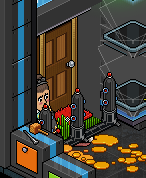
Enter The Door Teleports.
Bunny Hunt R1You have reached the starting point of the hunt. There is no fixed route to complete this event, you’ll be teleported to different rooms in the hunt as you search for the 3 keys needed to unlock the first burrow, Good Bunny Burrow. You’ll then need another 4 keys to unlock the second burrow, Bad Bunny Burrow. Travel to different rooms in search of the key by walking on the arrow room switchers in each room.
The following rooms will have a key in each room, keep your pixel eyes peeled and hunt around each room to locate the key, sometimes keys can be hard to spot or located inside a tent, so you’ll have to hunt!
R10, R11, R12, R13, R14, R16, R17
Once you have found a key in the above rooms, you need to click on it, you don’t need to stand near it.
When you have collected 3 keys, you can either go back to the start of the hunt R1 and enter the Good Bunny Burrow, and then return back to the hunt to collect 4 more keys and enter Bad Bunny Burrow, or you can collect all 7 keys at once and enter both burrows at the end, the choice is yours. To enter a burrow, you’ll need to step on the arrow located behind Thousand. Let’s begin..
Walk over to Thousand and stand on the orange circle
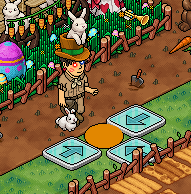
You now have 4 different arrows to choose from, choose one and walk on it to begin the hunt.

Bunny Hunt Rooms
You’ll now be inside a randomly selected room!
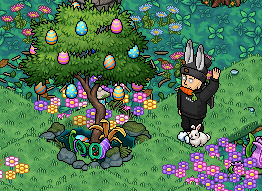
Choose and walk onto any of the 4 arrows.

You must now keep choosing random arrows and walking on them until you reach a room from the following list,
R10, R11, R12, R13, R14, R16, R17
Once you arrive in any of the above rooms, you must look around the rooms and click on the key, there will always be a key in these rooms, it moves around to different places and may be hard to spot, but there will always be one to collect in the rooms in this list!
If you’ve already been in a room and you’ve reached it again, keep traveling on the arrows until you’ve located another.
TIP: Here’s an example of a key location.
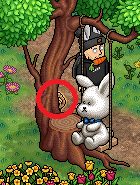
Once you have found the key, a message will pop up to confirm, you must then choose another arrow and follow the path until you reach the listed rooms and find the keys hidden inside.
After finding 3 keys..Now you’ve successfully found 3 hidden keys, you can either keep hunting to find all 7, or you can make your way back to Bunny Hunt R1 to access Good Bunny Burrow for your first badge!
Good Bunny BurrowWith your 3 keys, you can now access Good Bunny Burrow.
Make sure you’re back at Bunny Hunt R1,
Walk onto the arrow behind Thousand.
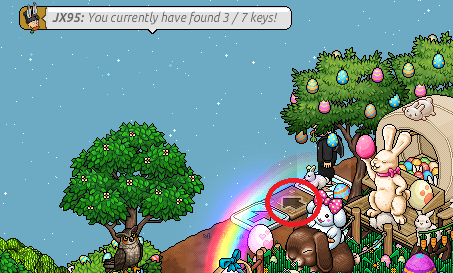
You’ll now be inside the Bunny Burrow Entrance.
Walk onto the left arrow to enter.
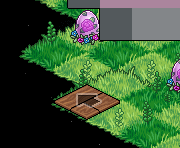
You’re now inside Good Bunny Burrow!
Walk onto the arrow to enter downstairs inside the burrow.
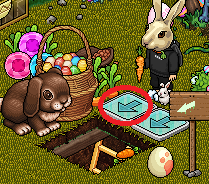
You’ll now have received your first badge!
Wave when you’re ready to return back to the entrance, Bunny Hunt R1, to continue the hunt for keys.

You’ll now be back inside the entrance and you can continue your hunt until you find all 7 keys.
After finding 7 keys..
With your 7 keys, you can now access the final burrow, Bad Bunny Burrow to receive your second badge.
Bad Bunny Burrow
Make sure you’re back at Bunny Hunt R1,
Walk onto the arrow behind Thousand.
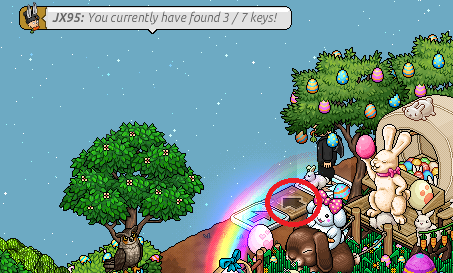
You’ll now be inside the Bunny Burrow Entrance.
Walk onto the right arrow to enter.
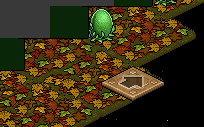
You’re now inside Bad Bunny Burrow!
Walk into the burrow by clicking the hole.
TIP: This can be harder to click on mobile, you can click the arrow behind the Earth Bunny if it is.
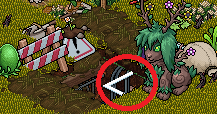
You’ll now have received your second and final badge!
You can wave to go back to the entrance if you wish.
Giveaway! Get ready to shellebrate, our Easter giveaway is full of eggciting prizes! Don’t chicken out, hop in and crack open some fun! 😉
To enter, simply just leave a comment on this guide! Tell us what you loved about this event, tell us your favourite room, or tell us how much you loved the puns, anything you like! Three lucky winners will win one of these prizes,
A Bunny Companion wearable will be awarded to the first lucky winner!

A Mammoth Bunny will be awarded to the second lucky winner!

A Dazzling Thunder Bunny NFT will be awarded to the Third lucky winner!

Winners will be contacted by JX95 and I carrot wait to give these prizes out.
A special thanks to our eggsquisite builder team who participated in this event, ears to you all!
JX95 Thousand FlyingJesus Tinkarbell .Nat _Spirit

We hope you enjoyed this Habbox event!
Leave a comment below about your experience.



 4
4







