
You will need:
This guide will show you how to set up the game Snake for you to host. For more information on the game, including how to play, check out our wiki page by clicking here.
Step 1: Making the Roller path
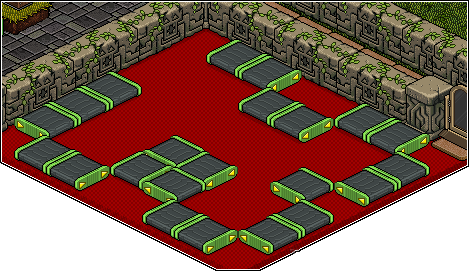
Start off with your empty game area and draw a path around it using Rollers, trying to keep a fair gap between any loop to reduce WIRED glitch. You can rotate them now to face where the flooring will be, or you can do that at the end, it really does not matter.
Step 2: Filling in the gaps
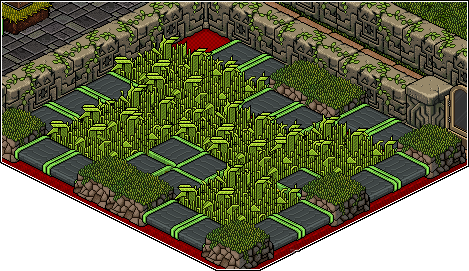
Once you have your path marked out, you’ll need to fill in the flooring you have decided to use. – Remember, if you have used 2×2 flooring, eg. Grass patches, etc, then you will also need a 1×1 furni as well for the corners, eg. Lost tribe stages. So use your Flooring to fill in all of the gaps. – If you’re using 1×1 tiles, then it’s best to leave the starting square blank.
Step 3: Adding the Start, Finish & Teleporting
This step is the easiest step in setting up this game. All you need to do is place your Exit Tile in the START place. You’ll also need to make a small area for people who have completed the snake to go. In this little area, place your freeze tile and one banzai teleport on top. After that, place your timer in a visible place where you can still access the buttons (even though, using the wired, you shouldn’t have to).
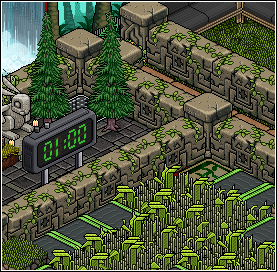
Step 4: Losing the game
So in this step, nice and easy, all you’ll need is your ‘User walks on Furni’ Triggers and your ‘Teleport to Furni’ Effect.

Set each of your ‘User Walks on Furniture’ triggers to the flooring you have put in (Including the corner pieces). Then set your ‘Teleport to Furniture’ to the exit tile.

Step 5: Starting the game
This is where it starts getting more complex. You will need x2 WIRED Effect: Match Furni State and Position, x1 WIRED Effect: Toggle Furni State, x1 WIRED Trigger: Furni State Is Changed and x1 WIRED Trigger: Game ends. You will need them in two stacks.
Stack One: Trigger: Furni State Is Changed, Effect: Match Furni State & Position, Effect: Toggle Furni State
Stack Two: Trigger: Game Ends, Effect: Match Furni State and Position.

Stack One:
Set the Trigger to your Switch.
Set your Effect: Toggle Furni State to your Timer.
Place your second Banzai Teleport at the END of the snake and set your Effect: Match Furni State & Position to it. (making sure ALL boxes are ticked).
Stack Two:
The Trigger does not (and cannot) be changed.
Move your Banzai Teleport out of the game area to where NOBODY can reach it, then set your Effect: Match Furni State and Position to it, (ensuring ALL boxes are ticked).


